At Meta, I can use Claude Code with unlimited tokens. But for personal use, I only have the 20/month pro plan. The question: how do I optimize for the best? How do I squeeze every drop of the tokens?
Token Charging Mechanism
The rate limit is 45 messages per 5-hour rolling window plus a weekly cap, shared across both claude.ai chat and Claude Code.
Usage Pattern
My usage splits sharply:
- Weekdays: Minimal (mostly a Claude Code skill for journaling)
- Weekends: Heavy coding nights, where most of the deep work happens
This leaves plenty of “chill” time during weekdays. The key insight: use these idle periods for work that doesn’t require fresh tokens—research, code reviews, and codebase analysis.
Analysis
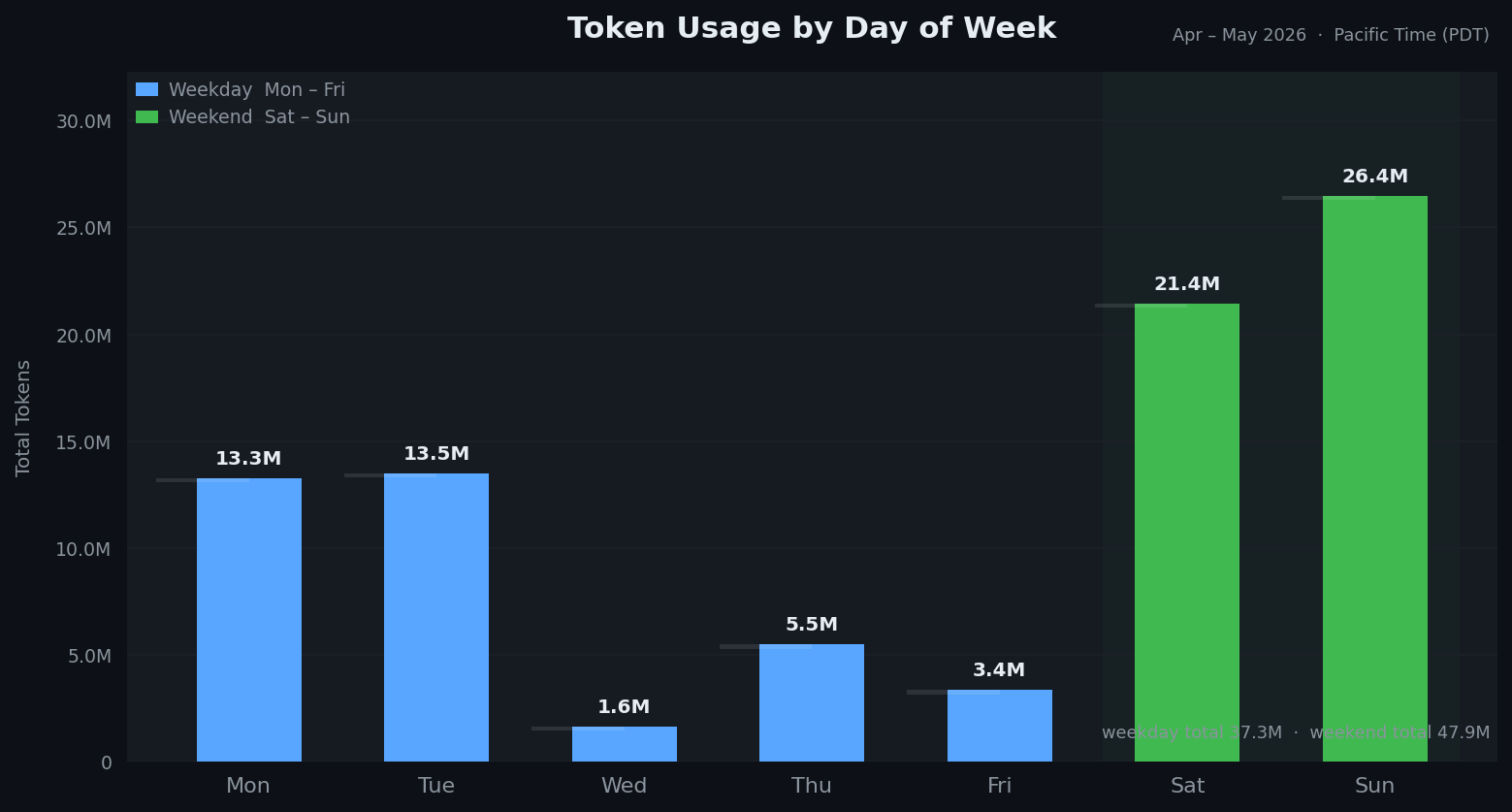
Day of Week: Weekend dominates (47.9M tokens Sat+Sun vs 37.3M weekday total). Mon/Tue peak at ~13M, but Wednesday drops to 1.6M. This confirms: weekends are deep-work days.
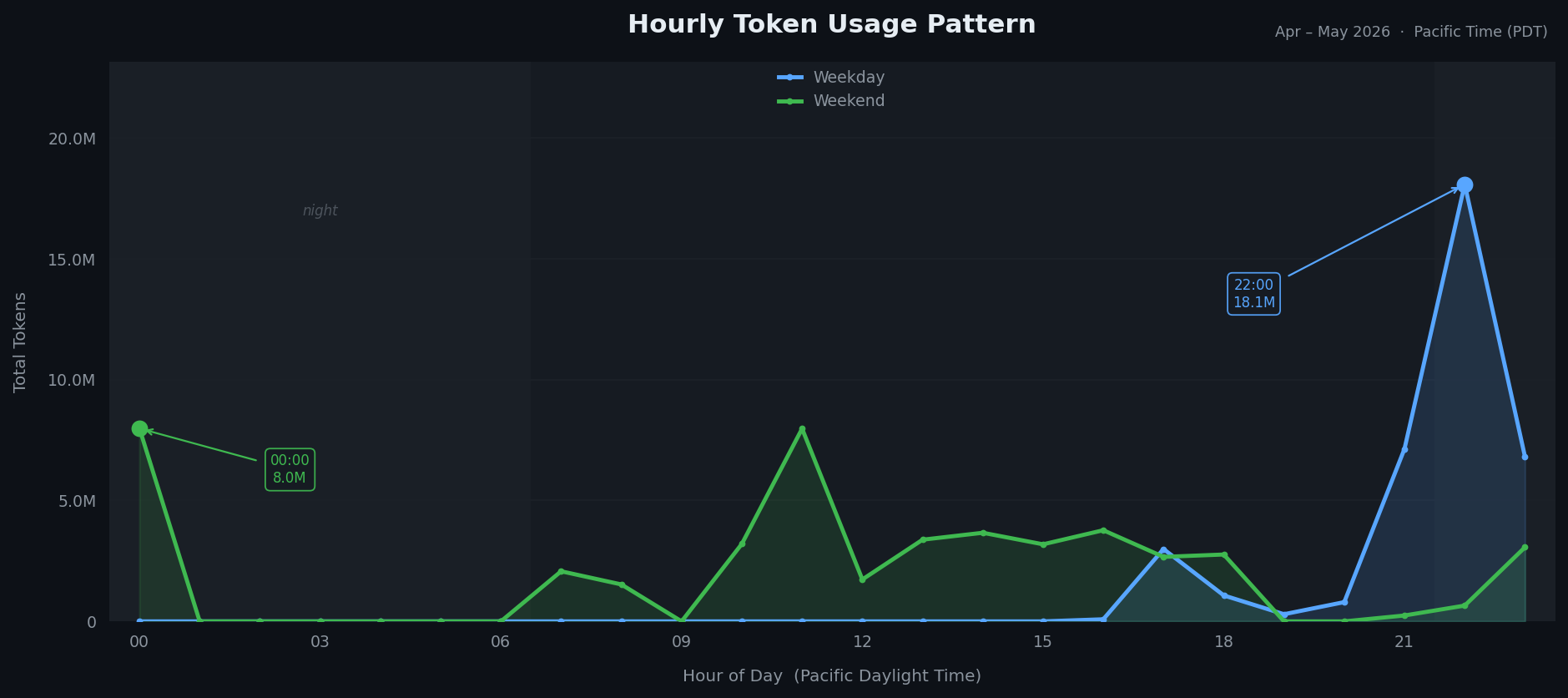
Hourly Pattern: Weekday usage concentrates at 22:00 PDT (10 PM)—pure late-night coding. Weekends have two peaks: midnight and late morning, suggesting sessions span multiple hours. Near-zero usage during business hours Mon–Fri.
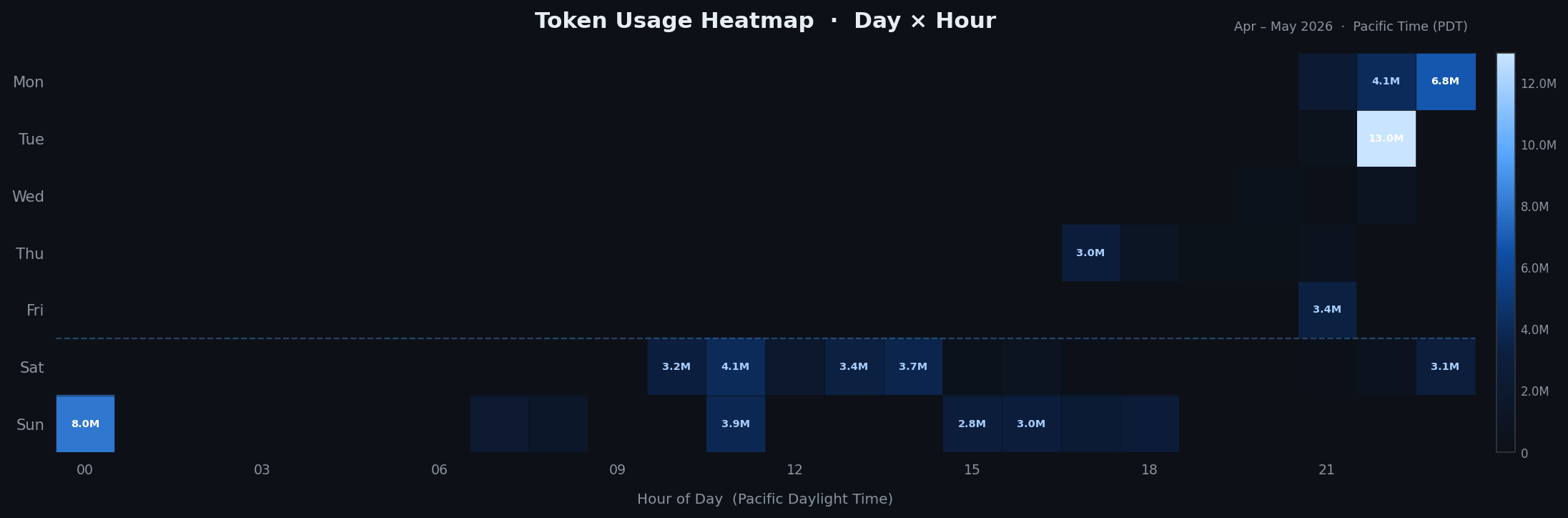
Hotspots: Tue 22:00 (13M peak), followed by Mon 22:00 and Sun midnight. Saturday afternoons (10:00–14:00) show relaxed, spread usage. Wednesday is consistently quiet.
Optimization Tricks
These tips come from Claude Code’s official usage guide.
1. Group Related Work in Projects Use projects for recurring work and related tasks. Same context, similar instructions, no need to re-upload documents repeatedly. This maximizes prompt cache benefits.
2. Start Fresh for Unrelated Tasks Unrelated tasks don’t benefit from long context history. Starting fresh avoids carrying unnecessary context that burns tokens.
3. Plan First, Execute Second Use Opus for planning and architecture, Sonnet for execution. This mirrors how humans work: expensive models for direction, cheaper models for implementation. You avoid writing 400 lines of code only to realize it’s wrong and need to roll back.
4. Schedule Research During Quiet Hours Set up recurring tasks during off-peak times when you’re not actively coding. Example: deep dives on people you follow (podcast/blog digests), compiled and ready to review when you return. This uses slack capacity without competing with your peak coding windows.
Concrete Example: Weekly Research Prompt
Here’s the exact prompt I use to digest startup/AI news every Sunday:
Today is {{date}}. You are a research assistant for a senior software engineer at Meta who is building an AI startup and developing VC instincts.

Do a web search for each person and topic below, covering the past 7 days.

## People to track

Search "[name] site:x.com OR interview OR essay OR podcast" for each:

Tier 1: Dario Amodei, Sam Altman, Jensen Huang, Andrej Karpathy, Yann LeCun, Ilya Sutskever

Tier 2: Gary Tan, Sarah Guo, Elad Gil, Nathan Benaich, Lex Fridman

Tier 3: Shawn Wang (swyx), Aravind Srinivas, Pieter Levels, Logan Kilpatrick, Clement Delangue

Also search: "AI startup funding this week", "new AI model release this week"

## Output format

### People — Notable this week

Only include people who published something significant. Skip if nothing notable.

For each: **[Name]** — what they said/did + why it matters to a startup builder

### Funding radar

3 bullets max. AI startups that raised this week.

Format: Company — stage — amount — what problem — lead investor

### Model/product releases

Any new model, API, or tool released this week worth knowing. 2-3 bullets.

### One pattern this week

One sentence: what theme connects the most significant things above?

### Your move

One specific action: something to read, try, or watch this week.

Keep everything concise. No fluff. Skip sections if nothing noteworthy happened.
Cadence: Every Sunday at 9:00 AM